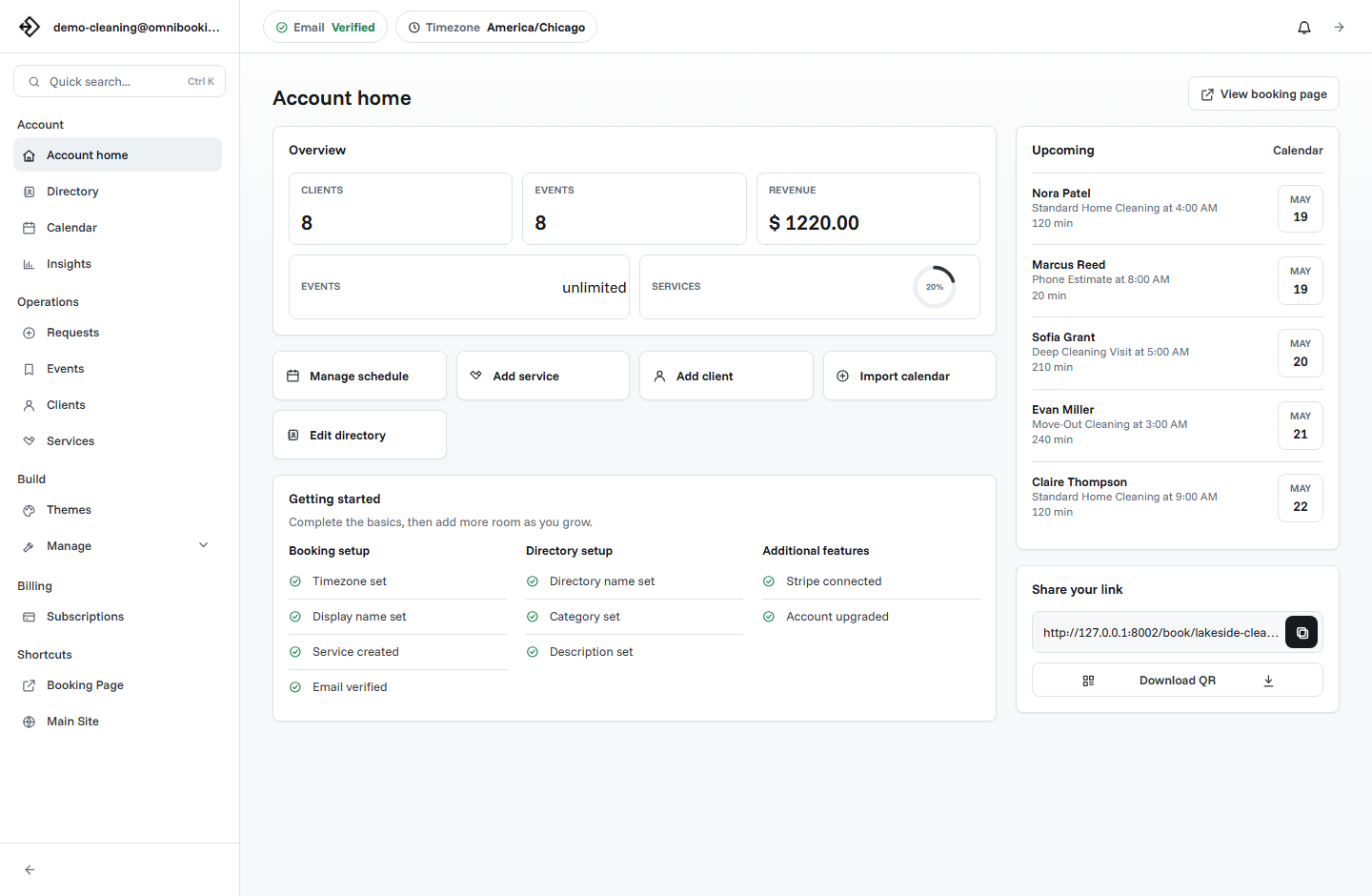
Online booking software is a tool that lets clients schedule appointments through a booking page instead of sending messages back and forth. A service business uses it to show services, display available times, collect client details, send confirmations, manage the calendar, and sometimes collect payment before the appointment.
Online booking software definition
Online booking software is the system behind a public scheduling link. It connects your services, availability, client forms, booking rules, notifications, and calendar into one workflow. A client does not need to call, text, or wait for a reply to see when you are available. They can open your booking page and choose from the times you allow.
For a small service business, this usually means less manual scheduling work. Instead of answering the same questions repeatedly, the booking page handles the first step: what you offer, when you are available, and what the client needs to do next.
How online booking software works
Most online booking systems follow a similar pattern. The business owner creates services and availability. The software turns those settings into available time slots. The client books from the page. The owner then manages the booking from a dashboard.
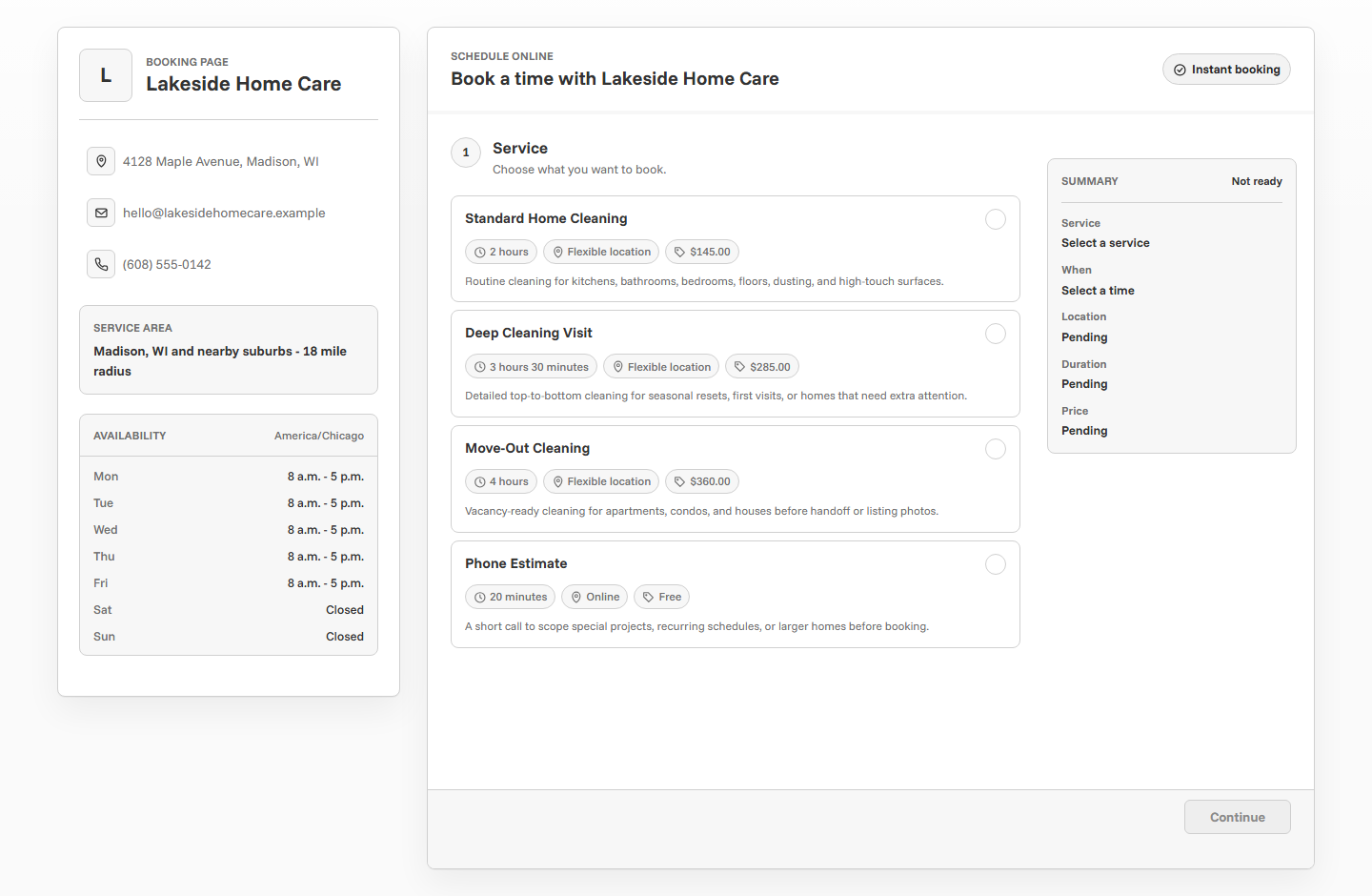
- The business creates services. Each service usually includes a name, description, duration, price, and any rules the client should know.
- The business sets availability. Working days, hours, breaks, booking delays, and blocked time determine what the client can select.
- The client opens the booking page. The page shows service options and available times based on the business settings.
- The client submits details. The form collects contact information and appointment details so the business has what it needs.
- The system creates an event or request. Depending on settings, the appointment may be confirmed, reviewed, or routed through payment first.
- Notifications keep everyone informed. Confirmation and reminder emails help clients remember the booking and understand next steps.
What online booking replaces
Online booking software usually replaces the most repetitive part of scheduling: finding a time that works. It can also replace scattered notes, manual reminders, and separate payment instructions.
Back-and-forth messages
Clients choose from available times instead of waiting for you to list openings.
Manual appointment notes
Client details, service choices, and appointment information stay attached to the booking.
Repeated reminders
Email reminders can reduce no-shows and help clients keep track of the appointment.
Separate payment instructions
For paid services, booking software can connect payment to the appointment flow.
Online booking software vs appointment scheduling
The terms are often used together, but they are not always identical. Appointment scheduling is the broad process of organizing time. Online booking software is the client-facing system that lets people schedule from a booking page.
A calendar app can help you schedule appointments manually. Online booking software helps clients schedule themselves within the rules you set. That difference matters when your business receives regular requests from new or returning clients.
Who needs online booking software?
Online booking software is most useful for businesses that sell time-based services. This includes solo providers, local service businesses, and small teams that need clients to choose an appointment time.
Examples include photographers, cleaners, contractors, trainers, tutors, stylists, consultants, pet groomers, wellness providers, repair services, and other appointment-based businesses. If your clients regularly ask "when are you available?", online booking can save time.
Important features to look for
- A booking page that works well on mobile.
- Service setup with duration, price, and description fields.
- Availability controls for working hours and blocked time.
- Client detail collection.
- Confirmation and reminder emails.
- Payment support for deposits or paid bookings.
- A dashboard for managing clients and appointments.
- Pricing that fits your appointment volume.
Example: how a cleaner might use online booking
A cleaning business could create three services: standard cleaning, deep cleaning, and move-out cleaning. Each service has a different duration and price. The owner opens weekdays from 9 AM to 4 PM, blocks weekends, and adds enough time between appointments for travel.
Clients use the booking page to choose the cleaning type, pick an available time, and submit contact details. If the business requires upfront payment or deposits, the owner can connect payment to selected services. The booking then appears in the dashboard, where the owner can manage the event and client information.
How to start with Omnibooking
With Omnibooking, you can create a booking page, add services, set availability, share your link, and manage appointments from the dashboard. The getting started guide walks through the setup process. If you need payments, read the Stripe Connect guide. If you are comparing cost, review the plans page.
Related resources
Best Online Booking System
Move from the definition to a practical feature comparison.
Scheduling vs Online Booking
Understand how the booking page fits into the larger scheduling workflow.
How to Create a Booking Page
Turn online booking concepts into a client-facing page.
Online Booking Checklist
Use the checklist when you are ready to set up and test the flow.
FAQs
What is online booking software?
Online booking software lets clients schedule services through a booking page. It usually includes service setup, availability, client forms, confirmations, reminders, and appointment management.
Is online booking software only for appointments?
It is most common for appointments, consultations, sessions, estimates, classes, and other time-based services. Any business that books time slots can use it.
Can online booking software prevent double booking?
It can help prevent double booking when availability and blocked time are configured correctly. The system should only show times that are allowed by your schedule.
Do I need a website to use online booking?
No. A hosted booking page can be shared directly. A website can help with marketing, but it is not required to start booking clients online.
Can I take payments through online booking software?
Many booking tools support payments. Omnibooking uses Stripe Connect for paid booking workflows when a fixed-price service should be paid before the booking is completed.